
Make changes to your inventory in seconds
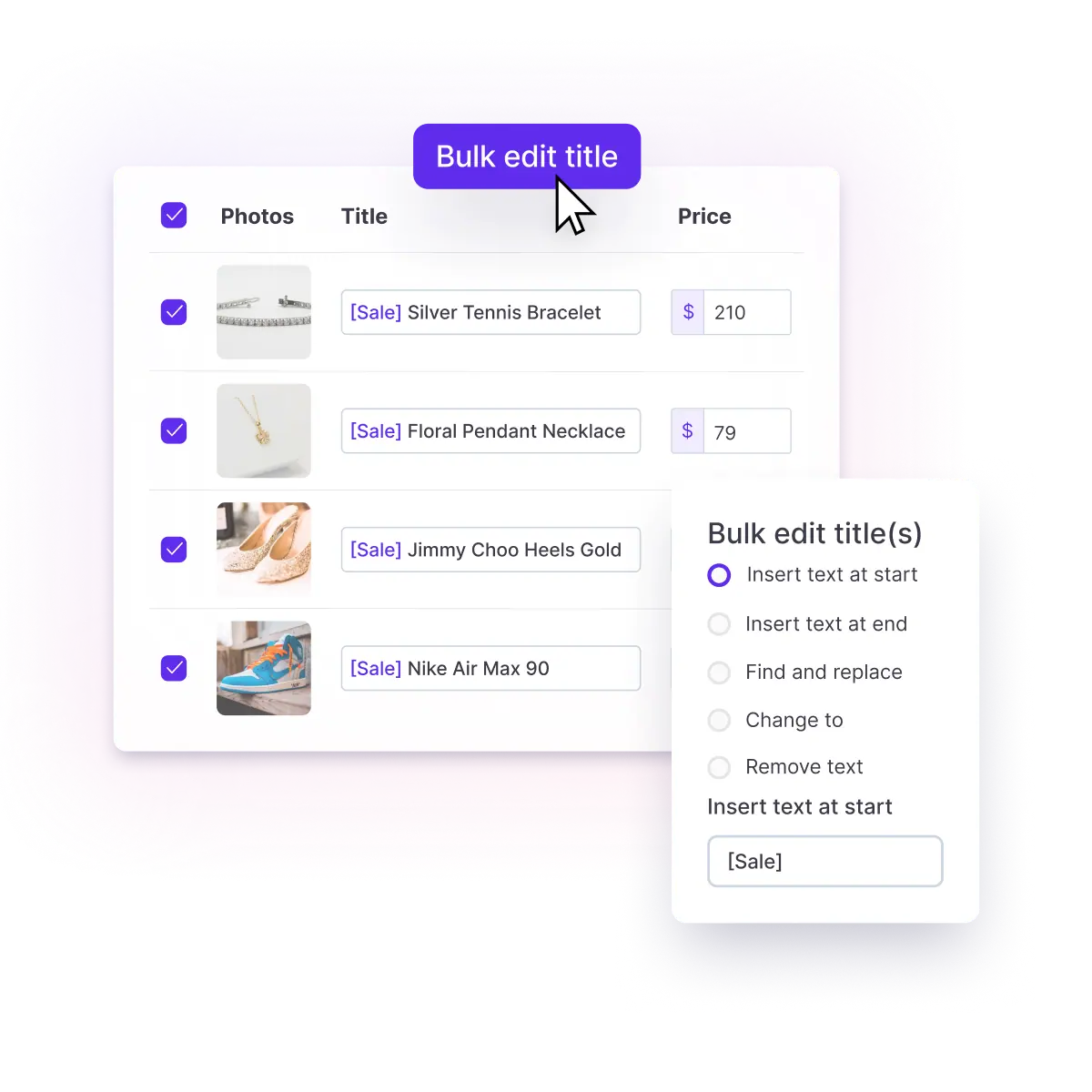
Crosslist® lets you edit listings, prices, and descriptions in bulk across your entire inventory in seconds. Try risk-free with our 3-day money-back guarantee.



Make changes to your inventory in seconds
Crosslist® lets you edit listings, prices, and descriptions in bulk across your entire inventory in seconds. Try risk-free with our 3-day money-back guarantee.
Make changes to your inventory in seconds
Crosslist® lets you edit listings, prices, and descriptions in bulk across your entire inventory in seconds. Try risk-free with our 3-day money-back guarantee.
Make changes to your inventory in seconds
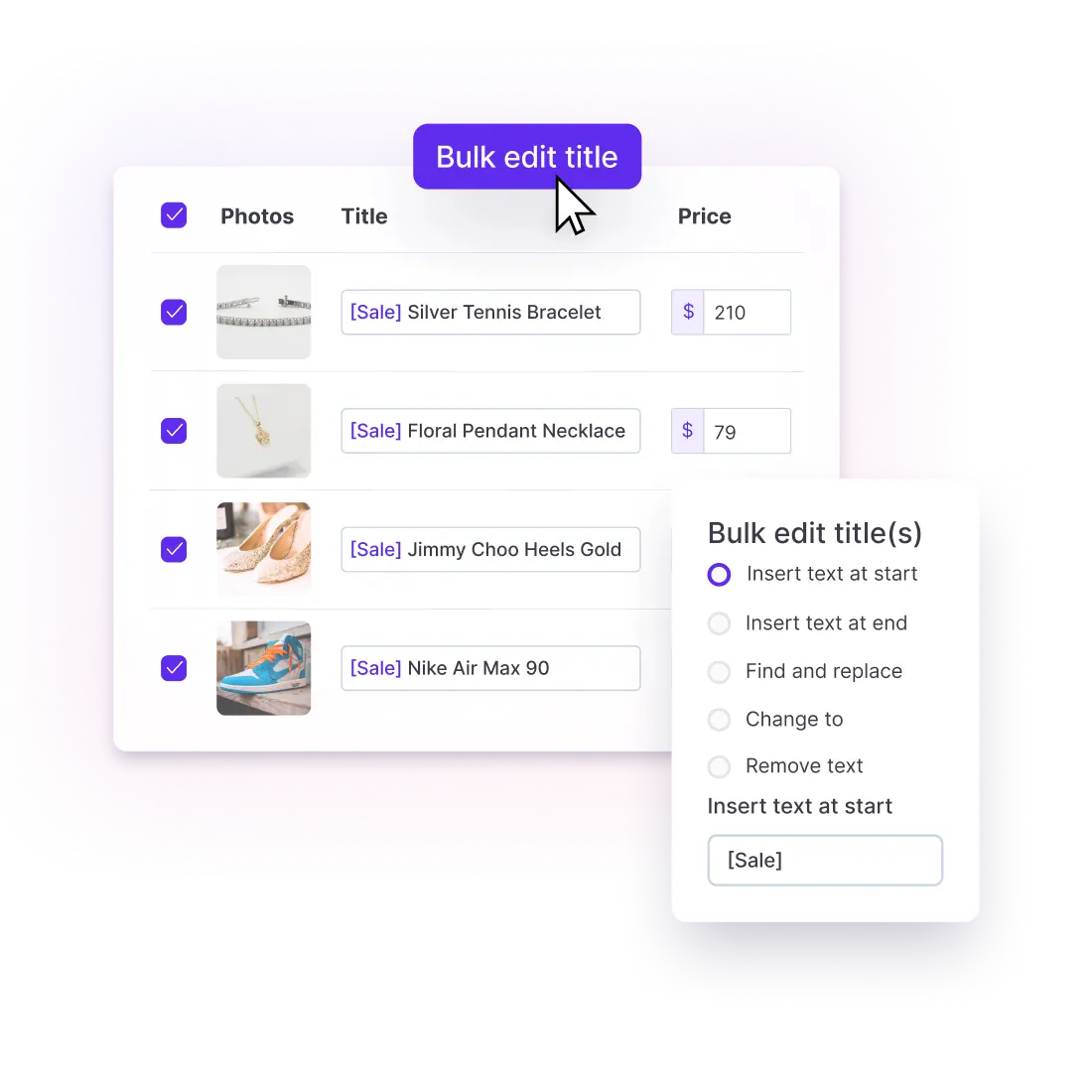
Crosslist® lets you edit listings, prices, and descriptions in bulk across your entire inventory in seconds. Try risk-free with our 3-day money-back guarantee.
Make changes to your inventory in seconds
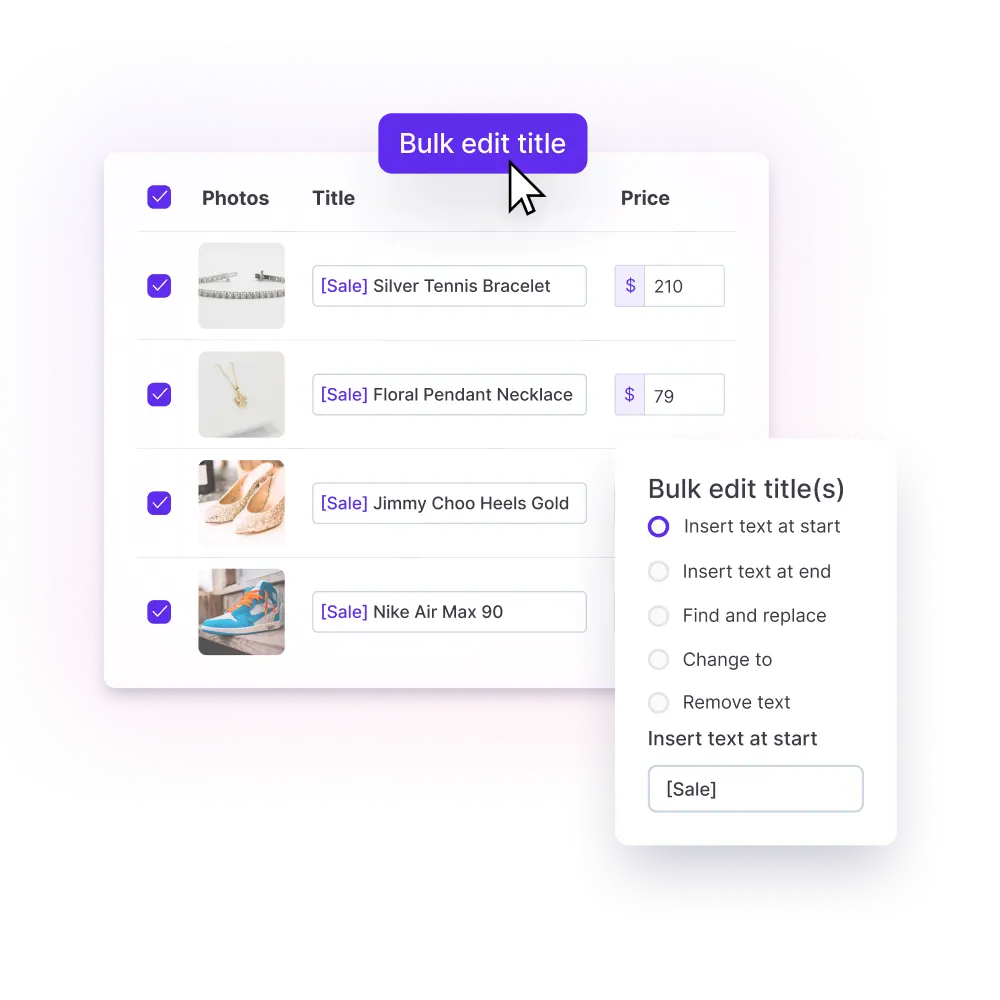
Crosslist® lets you edit listings, prices, and descriptions in bulk across your entire inventory in seconds. Try risk-free with our 3-day money-back guarantee.
How this feature works
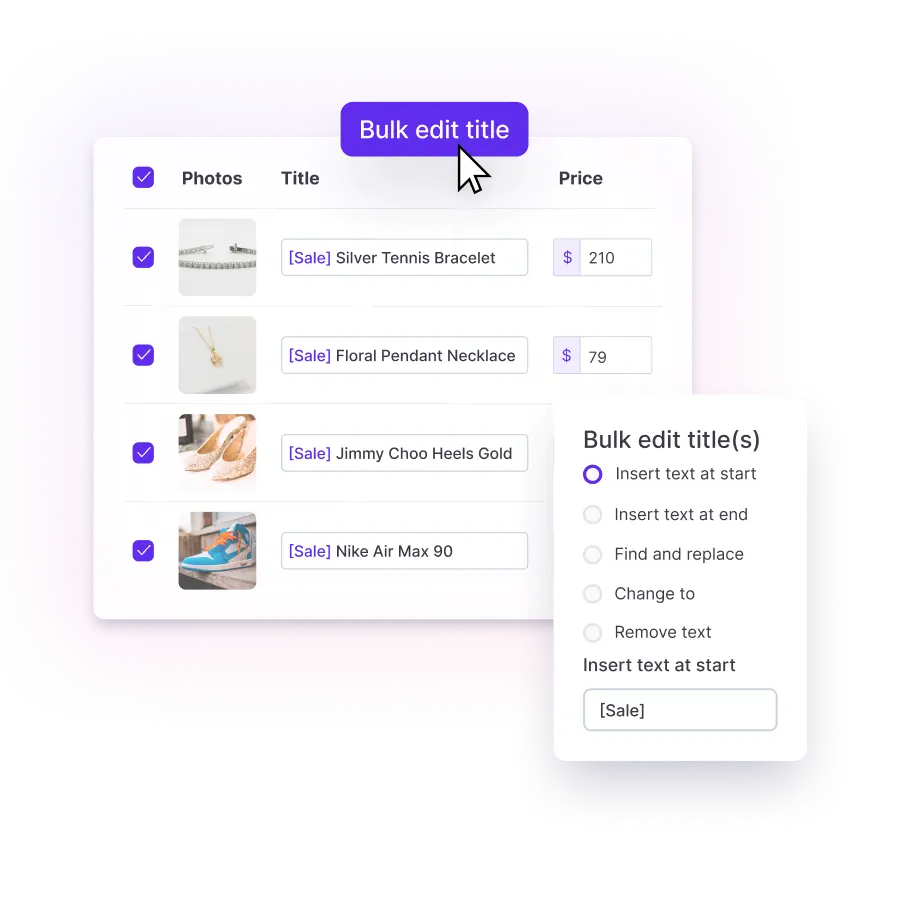
Crosslist® lets you edit, clone, delete, and update hundreds of listings at once using fast, batch-based tools that apply changes across your entire inventory instantly. Bulk-update descriptions, adjust prices with absolute or percentage changes, modify attributes, edit tags, prepend or append text, and clean up your listings in just a few clicks.
At a glance...
Make inventory-wide edits in seconds
Adjust prices for hundreds of items at once
Clone, archive or delete listings in bulk
Control your entire inventory from one view
“I dropped prices by 5% on a whole batch of items using bulk edit and pushed the updates to all marketplaces. So easy.“

Catherine D.
Source: Trustpilot
How this feature works
Crosslist® lets you edit, clone, delete, and update hundreds of listings at once using fast, batch-based tools that apply changes across your entire inventory instantly. Bulk-update descriptions, adjust prices with absolute or percentage changes, modify attributes, edit tags, prepend or append text, and clean up your listings in just a few clicks.
At a glance...
Make inventory-wide edits in seconds
Adjust prices for hundreds of items at once
Clone, archive or delete listings in bulk
Control your entire inventory from one view
“I dropped prices by 5% on a whole batch of items using bulk edit and pushed the updates to all marketplaces. So easy.“

Catherine D.
Source: Trustpilot
How this feature works
Crosslist® lets you edit, clone, delete, and update hundreds of listings at once using fast, batch-based tools that apply changes across your entire inventory instantly. Bulk-update descriptions, adjust prices with absolute or percentage changes, modify attributes, edit tags, prepend or append text, and clean up your listings in just a few clicks.
At a glance...
Make inventory-wide edits in seconds
Adjust prices for hundreds of items at once
Clone, archive or delete listings in bulk
Control your entire inventory from one view
“I dropped prices by 5% on a whole batch of items using bulk edit and pushed the updates to all marketplaces. So easy.“
Catherine D.
Source: Trustpilot
How this feature works
Crosslist® lets you edit, clone, delete, and update hundreds of listings at once using fast, batch-based tools that apply changes across your entire inventory instantly. Bulk-update descriptions, adjust prices with absolute or percentage changes, modify attributes, edit tags, prepend or append text, and clean up your listings in just a few clicks.
At a glance...
Make inventory-wide edits in seconds
Adjust prices for hundreds of items at once
Clone, archive or delete listings in bulk
Control your entire inventory from one view
“I dropped prices by 5% on a whole batch of items using bulk edit and pushed the updates to all marketplaces. So easy.“
Catherine D.
Source: Trustpilot
How this feature works
Crosslist® lets you edit, clone, delete, and update hundreds of listings at once using fast, batch-based tools that apply changes across your entire inventory instantly. Bulk-update descriptions, adjust prices with absolute or percentage changes, modify attributes, edit tags, prepend or append text, and clean up your listings in just a few clicks.
At a glance...
Make inventory-wide edits in seconds
Adjust prices for hundreds of items at once
Clone, archive or delete listings in bulk
Control your entire inventory from one view
“I dropped prices by 5% on a whole batch of items using bulk edit and pushed the updates to all marketplaces. So easy.“
Catherine D.
Source: Trustpilot
Why bulk actions are a game changer
Update, organize, and optimize hundreds of listings at once so you can scale without repetitive work.
“The bulk replace feature is amazing. I can change a word or phrase across all my descriptions instantly.“

Danielle H.
Source: Trustpilot
Why bulk actions are a game changer
Update, organize, and optimize hundreds of listings at once so you can scale without repetitive work.
“The bulk replace feature is amazing. I can change a word or phrase across all my descriptions instantly.“
Danielle H.
Source: Trustpilot
Why bulk actions are a game changer
Update, organize, and optimize hundreds of listings at once so you can scale without repetitive work.
“The bulk replace feature is amazing. I can change a word or phrase across all my descriptions instantly.“
Danielle H.
Source: Trustpilot
Why bulk actions are a game changer
Update, organize, and optimize hundreds of listings at once so you can scale without repetitive work.
“The bulk replace feature is amazing. I can change a word or phrase across all my descriptions instantly.“
Danielle H.
Source: Trustpilot
Why bulk actions are a game changer
Update, organize, and optimize hundreds of listings at once so you can scale without repetitive work.
“The bulk replace feature is amazing. I can change a word or phrase across all my descriptions instantly.“
Danielle H.
Source: Trustpilot
Before and after using Crosslist®’s bulk actions
See the difference and how it helps you grow
Without bulk actions
Edit listings one by one for hours
Miss seasonal opportunities
Inconsistent descriptions, tags, and pricing
Rebuild promotions or markdowns manually
Clone or delete listings individually
Burn out from repetitive editing and cleanup
Result: slow, inconsistent, exhausting
With bulk actions
Update hundreds of listings in minutes
Run holiday discounts and sales instantly
Apply consistent updates across all listings
Adjust prices up or down in bulk
Clone or delete listings in bulk instantly
Burn out from repetitive editing and cleanup
Result: fast, consistent, scalable
All the features Crosslist® has to offer
Cross listing
Transfer your listings between 11+ marketplaces in just a few clicks
One dynamic form
Create your listing once, then publish to all major marketplaces
Create listings with AI
Upload a photo and let AI create your entire listing in a few seconds
Autoposting
Publish listings in the background, while you work on other tasks
Relist & delist
Delist and relist with one click to keep your listings fresh and visible
AI pricing assistant
Use AI to suggest the right price based on real-time market insights
Background remover
Remove unlimited photo backgrounds for polished listings
Photo editor
Polish and edit your photos so that your listings stand out and sell faster
Shipping profiles
Set shipping profiles per marketplace and ship how you want
Listing templates
Create reusable listing templates to list faster and stay consistent
Price adjustments
Set different prices or markups for each marketplace to maximize profit
Bulk actions
Bulk edit listings to easily adjust prices, titles, descriptions and more
Smart organization
Easily organize your inventory with custom tags and powerful filters
Update listings
Push edits to your listings across multiple marketplaces in one click
Global presence
Transfer your listings between 11+ marketplaces in just a few clicks
Mobile support
Create and prepare listings using your phone or tablet
Import from CSV
Import your products from a CSV file to create new listings
Quick support
Chat with us and get a helpful reply quickly
“There are so many features I’ve yet to explore, and I know they’ll help my business grow even more.”

Craig R.
Bulk Lot Seller
Before and after using Crosslist®’s bulk actions
See the difference and how it helps you grow
Without bulk actions
Edit listings one by one for hours
Miss seasonal opportunities
Inconsistent descriptions, tags, and pricing
Rebuild promotions or markdowns manually
Clone or delete listings individually
Burn out from repetitive editing and cleanup
Result: slow, inconsistent, exhausting
With bulk actions
Update hundreds of listings in minutes
Run holiday discounts and sales instantly
Apply consistent updates across all listings
Adjust prices up or down in bulk
Clone or delete listings in bulk instantly
Burn out from repetitive editing and cleanup
Result: fast, consistent, scalable
All the features Crosslist® has to offer
Cross listing
Transfer your listings between 11+ marketplaces in just a few clicks
One dynamic form
Create your listing once, then publish to all major marketplaces
Create listings with AI
Upload a photo and let AI create your entire listing in a few seconds
Autoposting
Publish listings in the background, while you work on other tasks
Relist & delist
Delist and relist with one click to keep your listings fresh and visible
AI pricing assistant
Use AI to suggest the right price based on real-time market insights
Background remover
Remove unlimited photo backgrounds for polished listings
Photo editor
Polish and edit your photos so that your listings stand out and sell faster
Shipping profiles
Set shipping profiles per marketplace and ship how you want
Listing templates
Create reusable listing templates to list faster and stay consistent
Price adjustments
Set different prices or markups for each marketplace to maximize profit
Bulk actions
Bulk edit listings to easily adjust prices, titles, descriptions and more
Smart organization
Easily organize your inventory with custom tags and powerful filters
Update listings
Push edits to your listings across multiple marketplaces in one click
Global presence
Transfer your listings between 11+ marketplaces in just a few clicks
Mobile support
Create and prepare listings using your phone or tablet
Import from CSV
Import your products from a CSV file to create new listings
Quick support
Chat with us and get a helpful reply quickly
“There are so many features I’ve yet to explore, and I know they’ll help my business grow even more.”
Craig R.
Bulk Lot Seller
Before and after using Crosslist®’s bulk actions
See the difference and how it helps you grow
Without bulk actions
Edit listings one by one for hours
Miss seasonal opportunities
Inconsistent descriptions, tags, and pricing
Rebuild promotions or markdowns manually
Clone or delete listings individually
Burn out from repetitive editing and cleanup
Result: slow, inconsistent, exhausting
With bulk actions
Update hundreds of listings in minutes
Run holiday discounts and sales instantly
Apply consistent updates across all listings
Adjust prices up or down in bulk
Clone or delete listings in bulk instantly
Burn out from repetitive editing and cleanup
Result: fast, consistent, scalable
All the features Crosslist® has to offer
Cross listing
Transfer your listings between 11+ marketplaces in just a few clicks
One dynamic form
Create your listing once, then publish to all major marketplaces
Create listings with AI
Upload a photo and let AI create your entire listing in a few seconds
Autoposting
Publish listings in the background, while you work on other tasks
Relist & delist
Delist and relist with one click to keep your listings fresh and visible
AI pricing assistant
Use AI to suggest the right price based on real-time market insights
Background remover
Remove unlimited photo backgrounds for polished listings
Photo editor
Polish and edit your photos so that your listings stand out and sell faster
Shipping profiles
Set shipping profiles per marketplace and ship how you want
Listing templates
Create reusable listing templates to list faster and stay consistent
Price adjustments
Set different prices or markups for each marketplace to maximize profit
Bulk actions
Bulk edit listings to easily adjust prices, titles, descriptions and more
Smart organization
Easily organize your inventory with custom tags and powerful filters
Update listings
Push edits to your listings across multiple marketplaces in one click
Global presence
Transfer your listings between 11+ marketplaces in just a few clicks
Mobile support
Create and prepare listings using your phone or tablet
Import from CSV
Import your products from a CSV file to create new listings
Quick support
Chat with us and get a helpful reply quickly
“There are so many features I’ve yet to explore, and I know they’ll help my business grow even more.”
Craig R.
Bulk Lot Seller
Before and after using Crosslist®’s bulk actions
See the difference and how it helps you grow
Without bulk actions
Edit listings one by one for hours
Miss seasonal opportunities
Inconsistent descriptions, tags, and pricing
Rebuild promotions or markdowns manually
Clone or delete listings individually
Burn out from repetitive editing and cleanup
Result: slow, inconsistent, exhausting
With bulk actions
Update hundreds of listings in minutes
Run holiday discounts and sales instantly
Apply consistent updates across all listings
Adjust prices up or down in bulk
Clone or delete listings in bulk instantly
Burn out from repetitive editing and cleanup
Result: fast, consistent, scalable
All the features Crosslist® has to offer
Cross listing
Transfer your listings between 11+ marketplaces in just a few clicks
One dynamic form
Create your listing once, then publish to all major marketplaces
Create listings with AI
Upload a photo and let AI create your entire listing in a few seconds
Autoposting
Publish listings in the background, while you work on other tasks
Relist & delist
Delist and relist with one click to keep your listings fresh and visible
AI pricing assistant
Use AI to suggest the right price based on real-time market insights
Background remover
Remove unlimited photo backgrounds for polished listings
Photo editor
Polish and edit your photos so that your listings stand out and sell faster
Shipping profiles
Set shipping profiles per marketplace and ship how you want
Listing templates
Create reusable listing templates to list faster and stay consistent
Price adjustments
Set different prices or markups for each marketplace to maximize profit
Bulk actions
Bulk edit listings to easily adjust prices, titles, descriptions and more
Smart organization
Easily organize your inventory with custom tags and powerful filters
Update listings
Push edits to your listings across multiple marketplaces in one click
Global presence
Transfer your listings between 11+ marketplaces in just a few clicks
Mobile support
Create and prepare listings using your phone or tablet
Import from CSV
Import your products from a CSV file to create new listings
Quick support
Chat with us and get a helpful reply quickly
“There are so many features I’ve yet to explore, and I know they’ll help my business grow even more.”
Craig R.
Bulk Lot Seller
Before and after using Crosslist®’s bulk actions
See the difference and how it helps you grow
Without bulk actions
Edit listings one by one for hours
Miss seasonal opportunities
Inconsistent descriptions, tags, and pricing
Rebuild promotions or markdowns manually
Clone or delete listings individually
Burn out from repetitive editing and cleanup
Result: slow, inconsistent, exhausting
With bulk actions
Update hundreds of listings in minutes
Run holiday discounts and sales instantly
Apply consistent updates across all listings
Adjust prices up or down in bulk
Clone or delete listings in bulk instantly
Burn out from repetitive editing and cleanup
Result: fast, consistent, scalable
All the features Crosslist® has to offer
Cross listing
Transfer your listings between 11+ marketplaces in just a few clicks
One dynamic form
Create your listing once, then publish to all major marketplaces
Create listings with AI
Upload a photo and let AI create your entire listing in a few seconds
Autoposting
Publish listings in the background, while you work on other tasks
Relist & delist
Delist and relist with one click to keep your listings fresh and visible
AI pricing assistant
Use AI to suggest the right price based on real-time market insights
Background remover
Remove unlimited photo backgrounds for polished listings
Photo editor
Polish and edit your photos so that your listings stand out and sell faster
Shipping profiles
Set shipping profiles per marketplace and ship how you want
Listing templates
Create reusable listing templates to list faster and stay consistent
Price adjustments
Set different prices or markups for each marketplace to maximize profit
Bulk actions
Bulk edit listings to easily adjust prices, titles, descriptions and more
Smart organization
Easily organize your inventory with custom tags and powerful filters
Update listings
Push edits to your listings across multiple marketplaces in one click
Global presence
Transfer your listings between 11+ marketplaces in just a few clicks
Mobile support
Create and prepare listings using your phone or tablet
Import from CSV
Import your products from a CSV file to create new listings
Quick support
Chat with us and get a helpful reply quickly
“There are so many features I’ve yet to explore, and I know they’ll help my business grow even more.”
Craig R.
Bulk Lot Seller
Frequently asked questions
Everything you need to know about Crosslist®’s bulk actions
What can I edit with bulk actions?
You can update prices, descriptions, titles, tags, categories, and more across all selected listings.
You can also clone or delete listings in bulk when you need to reorganize your inventory.
Can I increase or decrease prices in bulk?
Yes. You can adjust prices by a specific amount or by percentage and apply the change to hundreds of listings at the same time.
How do I choose which listings to bulk edit?
Powerful filters let you select listings by category, marketplace, price range, date listed, tags, or any other criteria.
You stay in control of exactly which listings get updated.
What if I make a mistake during a bulk edit?
You can review your changes before applying them, and you can always re-run another bulk action to correct mistakes.
Bulk actions are flexible and reversible through additional updates.
Can I bulk delete or bulk clone listings?
Yes. You can clone listings in batches to multiply inventory quickly or delete outdated listings in bulk to keep your catalog clean and organized.
Frequently asked questions
Everything you need to know about Crosslist®’s bulk actions
What can I edit with bulk actions?
You can update prices, descriptions, titles, tags, categories, and more across all selected listings.
You can also clone or delete listings in bulk when you need to reorganize your inventory.
Can I increase or decrease prices in bulk?
Yes. You can adjust prices by a specific amount or by percentage and apply the change to hundreds of listings at the same time.
How do I choose which listings to bulk edit?
Powerful filters let you select listings by category, marketplace, price range, date listed, tags, or any other criteria.
You stay in control of exactly which listings get updated.
What if I make a mistake during a bulk edit?
You can review your changes before applying them, and you can always re-run another bulk action to correct mistakes.
Bulk actions are flexible and reversible through additional updates.
Can I bulk delete or bulk clone listings?
Yes. You can clone listings in batches to multiply inventory quickly or delete outdated listings in bulk to keep your catalog clean and organized.
Frequently asked questions
Everything you need to know about Crosslist®’s bulk actions
What can I edit with bulk actions?
You can update prices, descriptions, titles, tags, categories, and more across all selected listings.
You can also clone or delete listings in bulk when you need to reorganize your inventory.
Can I increase or decrease prices in bulk?
Yes. You can adjust prices by a specific amount or by percentage and apply the change to hundreds of listings at the same time.
How do I choose which listings to bulk edit?
Powerful filters let you select listings by category, marketplace, price range, date listed, tags, or any other criteria.
You stay in control of exactly which listings get updated.
What if I make a mistake during a bulk edit?
You can review your changes before applying them, and you can always re-run another bulk action to correct mistakes.
Bulk actions are flexible and reversible through additional updates.
Can I bulk delete or bulk clone listings?
Yes. You can clone listings in batches to multiply inventory quickly or delete outdated listings in bulk to keep your catalog clean and organized.
Frequently asked questions
Everything you need to know about Crosslist®’s bulk actions
What can I edit with bulk actions?
You can update prices, descriptions, titles, tags, categories, and more across all selected listings.
You can also clone or delete listings in bulk when you need to reorganize your inventory.
Can I increase or decrease prices in bulk?
Yes. You can adjust prices by a specific amount or by percentage and apply the change to hundreds of listings at the same time.
How do I choose which listings to bulk edit?
Powerful filters let you select listings by category, marketplace, price range, date listed, tags, or any other criteria.
You stay in control of exactly which listings get updated.
What if I make a mistake during a bulk edit?
You can review your changes before applying them, and you can always re-run another bulk action to correct mistakes.
Bulk actions are flexible and reversible through additional updates.
Can I bulk delete or bulk clone listings?
Yes. You can clone listings in batches to multiply inventory quickly or delete outdated listings in bulk to keep your catalog clean and organized.
Frequently asked questions
Everything you need to know about Crosslist®’s bulk actions
What can I edit with bulk actions?
You can update prices, descriptions, titles, tags, categories, and more across all selected listings.
You can also clone or delete listings in bulk when you need to reorganize your inventory.
Can I increase or decrease prices in bulk?
Yes. You can adjust prices by a specific amount or by percentage and apply the change to hundreds of listings at the same time.
How do I choose which listings to bulk edit?
Powerful filters let you select listings by category, marketplace, price range, date listed, tags, or any other criteria.
You stay in control of exactly which listings get updated.
What if I make a mistake during a bulk edit?
You can review your changes before applying them, and you can always re-run another bulk action to correct mistakes.
Bulk actions are flexible and reversible through additional updates.
Can I bulk delete or bulk clone listings?
Yes. You can clone listings in batches to multiply inventory quickly or delete outdated listings in bulk to keep your catalog clean and organized.
Try risk-free with our 3-day money-back guarantee!
Join 40,000+ sellers who are growing their business with Crosslist®
Try risk-free with our 3-day money-back guarantee!
Join 40,000+ sellers who are growing their business with Crosslist®
Try risk-free with our 3-day money-back guarantee!
Join 40,000+ sellers who are growing their business with Crosslist®
Try risk-free with our 3-day money-back guarantee!
Join 40,000+ sellers who are growing their business with Crosslist®
Try risk-free with our 3-day money-back guarantee!
Join 40,000+ sellers who are growing their business with Crosslist®