
Create studio-quality photos with AI
Crosslist® lets you enhance lighting, color, and image quality with AI in seconds, with manual control when needed. Try risk-free with our 3-day money-back guarantee.



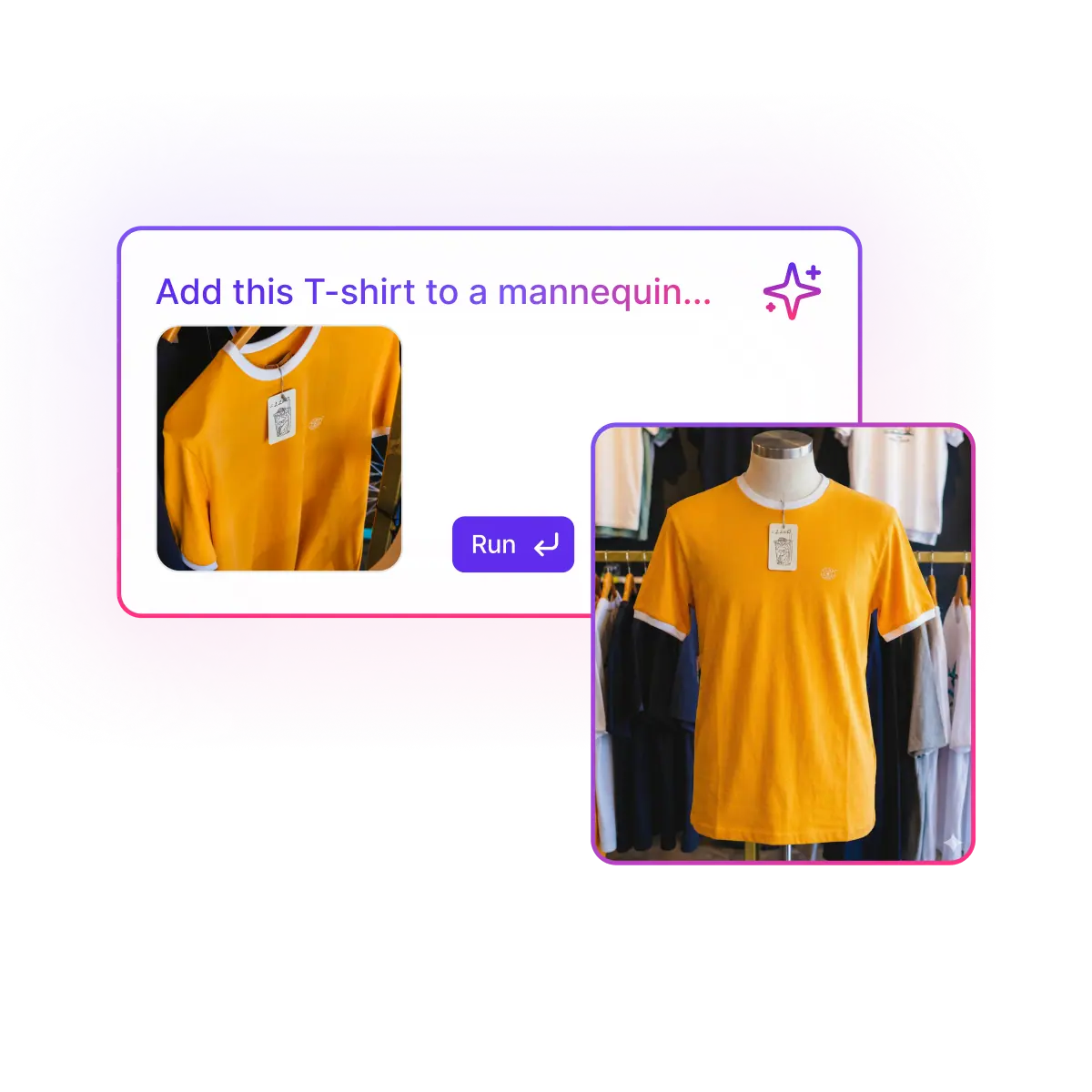
Create studio-quality photos with AI
Crosslist® lets you enhance lighting, color, and image quality with AI in seconds, with manual control when needed. Try risk-free with our 3-day money-back guarantee.
Create studio-quality photos with AI
Crosslist® lets you enhance lighting, color, and image quality with AI in seconds, with manual control when needed. Try risk-free with our 3-day money-back guarantee.
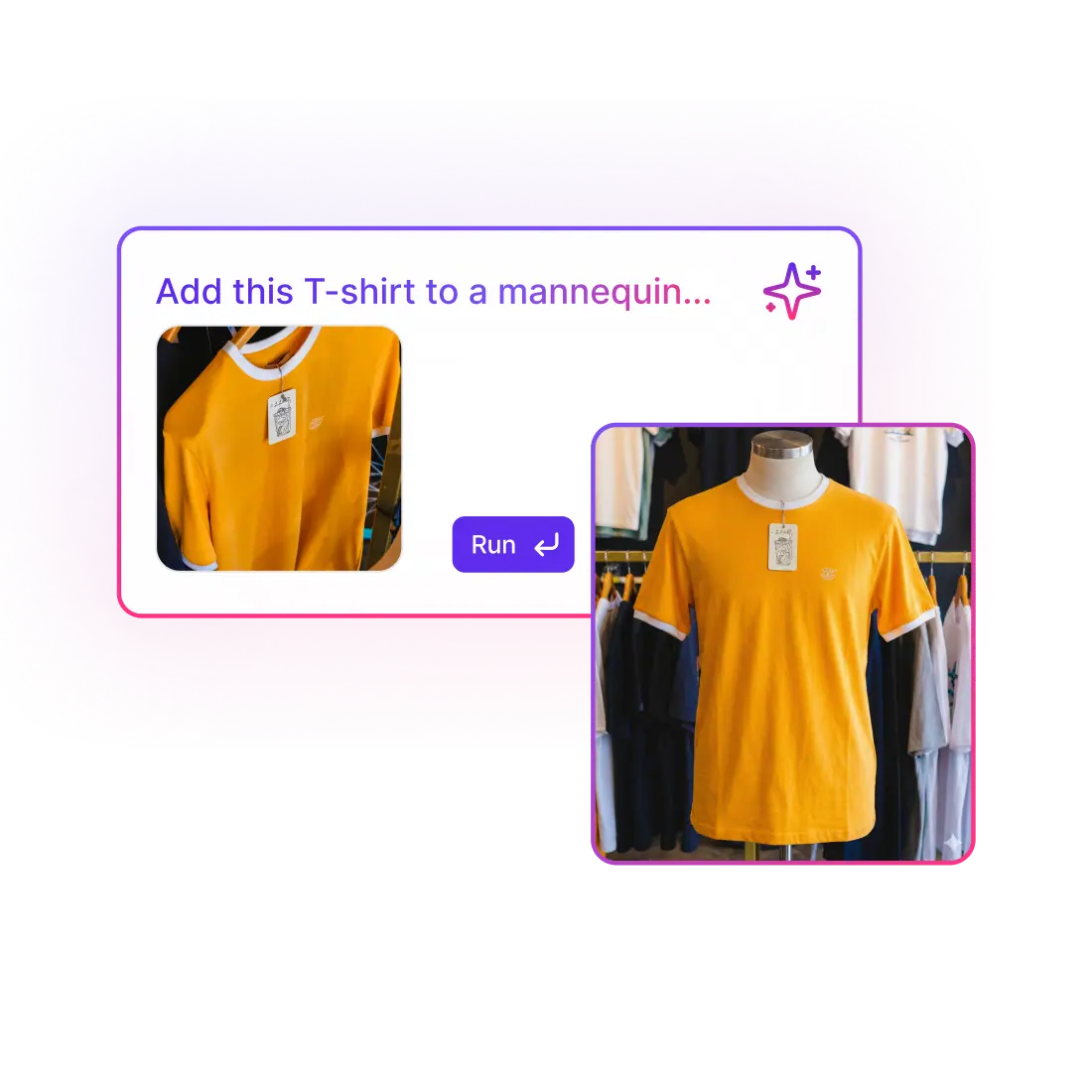
Create studio-quality photos with AI
Crosslist® lets you enhance lighting, color, and image quality with AI in seconds, with manual control when needed. Try risk-free with our 3-day money-back guarantee.
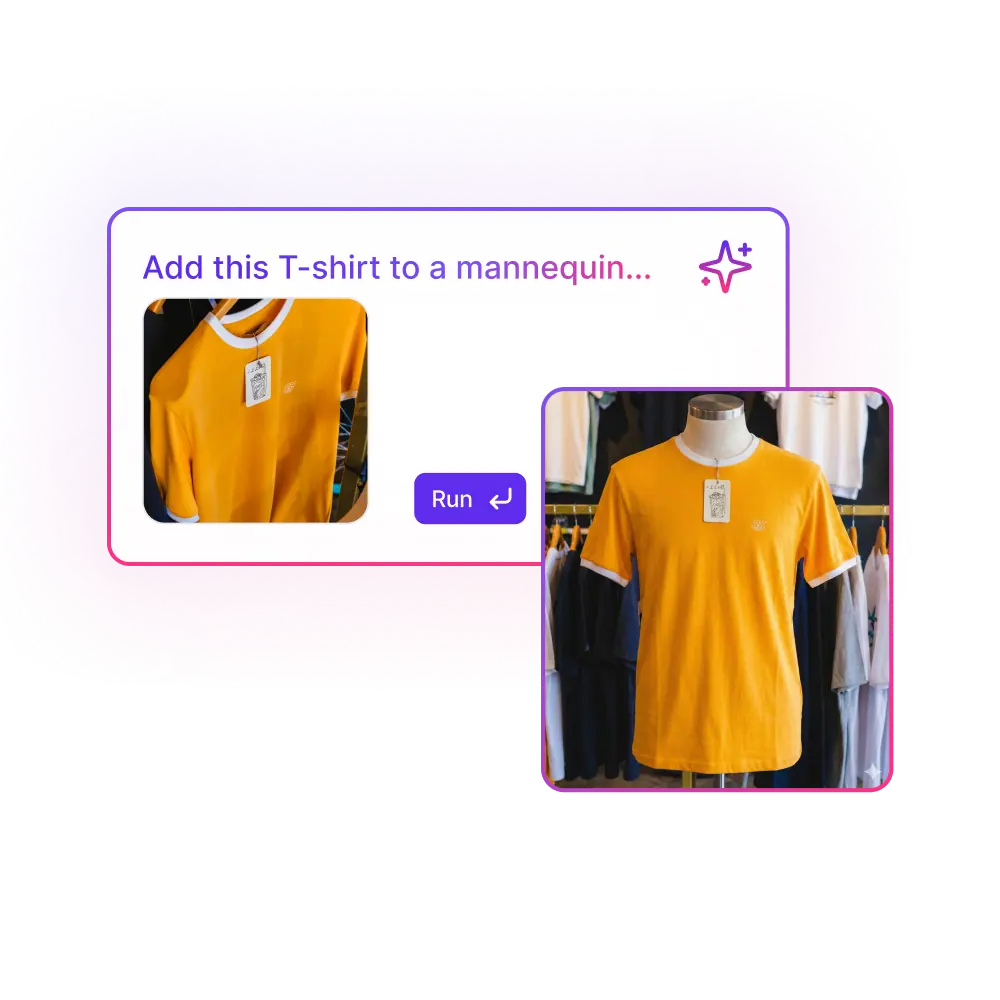
Create studio-quality photos with AI
Crosslist® lets you enhance lighting, color, and image quality with AI in seconds, with manual control when needed. Try risk-free with our 3-day money-back guarantee.
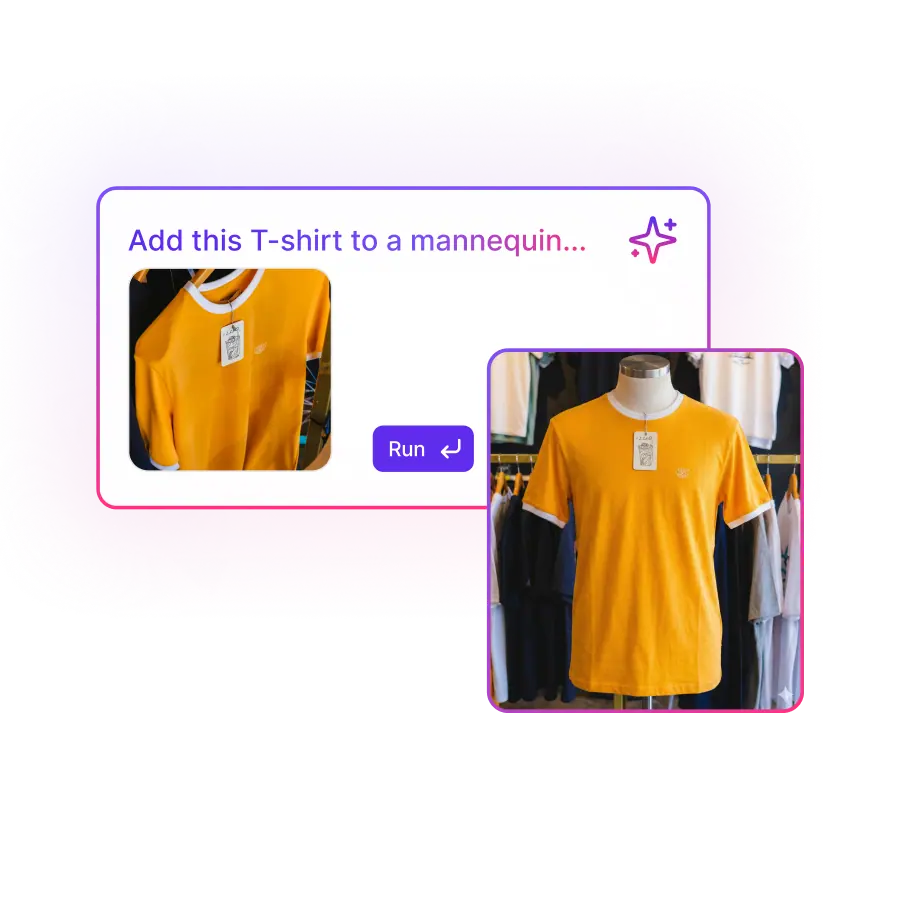
How this feature works
Crosslist®’s AI instantly improves lighting, color, sharpness and clarity, and can even generate new images from a prompt. Fix imperfections or enhance your photos in seconds. For full control, use the manual editor to crop, adjust colors and fine-tune details. Create studio-quality visuals that stand out everywhere you sell.
At a glance...
Use AI prompts to enhance any photo instantly
Create new product images entirely from a prompt
Edit your images using AI-powered reference photos
Fine-tune results with advanced manual editing tools anytime
“I also love the AI photo editing feature and extensive editing options. Totally worth the investment!“

Meagan W.
Source: Trustpilot
How this feature works
Crosslist®’s AI instantly improves lighting, color, sharpness and clarity, and can even generate new images from a prompt. Fix imperfections or enhance your photos in seconds. For full control, use the manual editor to crop, adjust colors and fine-tune details. Create studio-quality visuals that stand out everywhere you sell.
At a glance...
Use AI prompts to enhance any photo instantly
Create new product images entirely from a prompt
Edit your images using AI-powered reference photos
Fine-tune results with advanced manual editing tools anytime
“I also love the AI photo editing feature and extensive editing options. Totally worth the investment!“

Meagan W.
Source: Trustpilot
How this feature works
Crosslist®’s AI instantly improves lighting, color, sharpness and clarity, and can even generate new images from a prompt. Fix imperfections or enhance your photos in seconds. For full control, use the manual editor to crop, adjust colors and fine-tune details. Create studio-quality visuals that stand out everywhere you sell.
At a glance...
Use AI prompts to enhance any photo instantly
Create new product images entirely from a prompt
Edit your images using AI-powered reference photos
Fine-tune results with advanced manual editing tools anytime
“I also love the AI photo editing feature and extensive editing options. Totally worth the investment!“
Meagan W.
Source: Trustpilot
How this feature works
Crosslist®’s AI instantly improves lighting, color, sharpness and clarity, and can even generate new images from a prompt. Fix imperfections or enhance your photos in seconds. For full control, use the manual editor to crop, adjust colors and fine-tune details. Create studio-quality visuals that stand out everywhere you sell.
At a glance...
Use AI prompts to enhance any photo instantly
Create new product images entirely from a prompt
Edit your images using AI-powered reference photos
Fine-tune results with advanced manual editing tools anytime
“I also love the AI photo editing feature and extensive editing options. Totally worth the investment!“
Meagan W.
Source: Trustpilot
How this feature works
Crosslist®’s AI instantly improves lighting, color, sharpness and clarity, and can even generate new images from a prompt. Fix imperfections or enhance your photos in seconds. For full control, use the manual editor to crop, adjust colors and fine-tune details. Create studio-quality visuals that stand out everywhere you sell.
At a glance...
Use AI prompts to enhance any photo instantly
Create new product images entirely from a prompt
Edit your images using AI-powered reference photos
Fine-tune results with advanced manual editing tools anytime
“I also love the AI photo editing feature and extensive editing options. Totally worth the investment!“
Meagan W.
Source: Trustpilot
Why the AI photo editor is a game changer
Create stunning product photos in seconds with AI enhancements, smart retouching, and manual tools in one studio.
“I sell a lot of new-in-box items, and the AI photo editor is great because it creates stock photos I can use alongside my own. Makes the listing look a lot more complete.“

Chris L.
Source: Trustpilot
Why the AI photo editor is a game changer
Create stunning product photos in seconds with AI enhancements, smart retouching, and manual tools in one studio.
“I sell a lot of new-in-box items, and the AI photo editor is great because it creates stock photos I can use alongside my own. Makes the listing look a lot more complete.“
Chris L.
Source: Trustpilot
Why the AI photo editor is a game changer
Create stunning product photos in seconds with AI enhancements, smart retouching, and manual tools in one studio.
“I sell a lot of new-in-box items, and the AI photo editor is great because it creates stock photos I can use alongside my own. Makes the listing look a lot more complete.“
Chris L.
Source: Trustpilot
Why the AI photo editor is a game changer
Create stunning product photos in seconds with AI enhancements, smart retouching, and manual tools in one studio.
“I sell a lot of new-in-box items, and the AI photo editor is great because it creates stock photos I can use alongside my own. Makes the listing look a lot more complete.“
Chris L.
Source: Trustpilot
Why the AI photo editor is a game changer
Create stunning product photos in seconds with AI enhancements, smart retouching, and manual tools in one studio.
“I sell a lot of new-in-box items, and the AI photo editor is great because it creates stock photos I can use alongside my own. Makes the listing look a lot more complete.“
Chris L.
Source: Trustpilot
Before and after using Crosslist®’s AI photo editor
See the difference and how it helps you grow
Without the AI photo editor
Rely on raw, unedited smartphone pictures
Spend time fixing lighting, shadows and colors manually
Struggle to keep photos consistent across listings
No way to generate missing angles or variants
Can't create lifestyle or branded visuals
Limited tools for detailed corrections
Result: unpolished, inconsistent, hard to improve
With the AI photo editor
Enhance photos instantly with AI cleanup and lighting
Generate new product photos from simple prompts
Keep a consistent, professional look across all listings
Use manual editing tools when you want full control
Create lifestyle and branded visuals effortlessly
Limited tools for detailed corrections
Result: polished, consistent, high-converting visuals
All the features Crosslist® has to offer
Cross listing
Transfer your listings between 11+ marketplaces in just a few clicks
One dynamic form
Create your listing once, then publish to all major marketplaces
Create listings with AI
Upload a photo and let AI create your entire listing in a few seconds
Autoposting
Publish listings in the background, while you work on other tasks
Relist & delist
Delist and relist with one click to keep your listings fresh and visible
AI pricing assistant
Use AI to suggest the right price based on real-time market insights
Background remover
Remove unlimited photo backgrounds for polished listings
Photo editor
Polish and edit your photos so that your listings stand out and sell faster
Shipping profiles
Set shipping profiles per marketplace and ship how you want
Listing templates
Create reusable listing templates to list faster and stay consistent
Price adjustments
Set different prices or markups for each marketplace to maximize profit
Bulk actions
Bulk edit listings to easily adjust prices, titles, descriptions and more
Smart organization
Easily organize your inventory with custom tags and powerful filters
Update listings
Push edits to your listings across multiple marketplaces in one click
Global presence
Transfer your listings between 11+ marketplaces in just a few clicks
Mobile support
Create and prepare listings using your phone or tablet
Import from CSV
Import your products from a CSV file to create new listings
Quick support
Chat with us and get a helpful reply quickly
“There are so many features I’ve yet to explore, and I know they’ll help my business grow even more.”

Craig R.
Bulk Lot Seller
Before and after using Crosslist®’s AI photo editor
See the difference and how it helps you grow
Without the AI photo editor
Rely on raw, unedited smartphone pictures
Spend time fixing lighting, shadows and colors manually
Struggle to keep photos consistent across listings
No way to generate missing angles or variants
Can't create lifestyle or branded visuals
Limited tools for detailed corrections
Result: unpolished, inconsistent, hard to improve
With the AI photo editor
Enhance photos instantly with AI cleanup and lighting
Generate new product photos from simple prompts
Keep a consistent, professional look across all listings
Use manual editing tools when you want full control
Create lifestyle and branded visuals effortlessly
Limited tools for detailed corrections
Result: polished, consistent, high-converting visuals
All the features Crosslist® has to offer
Cross listing
Transfer your listings between 11+ marketplaces in just a few clicks
One dynamic form
Create your listing once, then publish to all major marketplaces
Create listings with AI
Upload a photo and let AI create your entire listing in a few seconds
Autoposting
Publish listings in the background, while you work on other tasks
Relist & delist
Delist and relist with one click to keep your listings fresh and visible
AI pricing assistant
Use AI to suggest the right price based on real-time market insights
Background remover
Remove unlimited photo backgrounds for polished listings
Photo editor
Polish and edit your photos so that your listings stand out and sell faster
Shipping profiles
Set shipping profiles per marketplace and ship how you want
Listing templates
Create reusable listing templates to list faster and stay consistent
Price adjustments
Set different prices or markups for each marketplace to maximize profit
Bulk actions
Bulk edit listings to easily adjust prices, titles, descriptions and more
Smart organization
Easily organize your inventory with custom tags and powerful filters
Update listings
Push edits to your listings across multiple marketplaces in one click
Global presence
Transfer your listings between 11+ marketplaces in just a few clicks
Mobile support
Create and prepare listings using your phone or tablet
Import from CSV
Import your products from a CSV file to create new listings
Quick support
Chat with us and get a helpful reply quickly
“There are so many features I’ve yet to explore, and I know they’ll help my business grow even more.”
Craig R.
Bulk Lot Seller
Before and after using Crosslist®’s AI photo editor
See the difference and how it helps you grow
Without the AI photo editor
Rely on raw, unedited smartphone pictures
Spend time fixing lighting, shadows and colors manually
Struggle to keep photos consistent across listings
No way to generate missing angles or variants
Can't create lifestyle or branded visuals
Limited tools for detailed corrections
Result: unpolished, inconsistent, hard to improve
With the AI photo editor
Enhance photos instantly with AI cleanup and lighting
Generate new product photos from simple prompts
Keep a consistent, professional look across all listings
Use manual editing tools when you want full control
Create lifestyle and branded visuals effortlessly
Limited tools for detailed corrections
Result: polished, consistent, high-converting visuals
All the features Crosslist® has to offer
Cross listing
Transfer your listings between 11+ marketplaces in just a few clicks
One dynamic form
Create your listing once, then publish to all major marketplaces
Create listings with AI
Upload a photo and let AI create your entire listing in a few seconds
Autoposting
Publish listings in the background, while you work on other tasks
Relist & delist
Delist and relist with one click to keep your listings fresh and visible
AI pricing assistant
Use AI to suggest the right price based on real-time market insights
Background remover
Remove unlimited photo backgrounds for polished listings
Photo editor
Polish and edit your photos so that your listings stand out and sell faster
Shipping profiles
Set shipping profiles per marketplace and ship how you want
Listing templates
Create reusable listing templates to list faster and stay consistent
Price adjustments
Set different prices or markups for each marketplace to maximize profit
Bulk actions
Bulk edit listings to easily adjust prices, titles, descriptions and more
Smart organization
Easily organize your inventory with custom tags and powerful filters
Update listings
Push edits to your listings across multiple marketplaces in one click
Global presence
Transfer your listings between 11+ marketplaces in just a few clicks
Mobile support
Create and prepare listings using your phone or tablet
Import from CSV
Import your products from a CSV file to create new listings
Quick support
Chat with us and get a helpful reply quickly
“There are so many features I’ve yet to explore, and I know they’ll help my business grow even more.”
Craig R.
Bulk Lot Seller
Before and after using Crosslist®’s AI photo editor
See the difference and how it helps you grow
Without the AI photo editor
Rely on raw, unedited smartphone pictures
Spend time fixing lighting, shadows and colors manually
Struggle to keep photos consistent across listings
No way to generate missing angles or variants
Can't create lifestyle or branded visuals
Limited tools for detailed corrections
Result: unpolished, inconsistent, hard to improve
With the AI photo editor
Enhance photos instantly with AI cleanup and lighting
Generate new product photos from simple prompts
Keep a consistent, professional look across all listings
Use manual editing tools when you want full control
Create lifestyle and branded visuals effortlessly
Limited tools for detailed corrections
Result: polished, consistent, high-converting visuals
All the features Crosslist® has to offer
Cross listing
Transfer your listings between 11+ marketplaces in just a few clicks
One dynamic form
Create your listing once, then publish to all major marketplaces
Create listings with AI
Upload a photo and let AI create your entire listing in a few seconds
Autoposting
Publish listings in the background, while you work on other tasks
Relist & delist
Delist and relist with one click to keep your listings fresh and visible
AI pricing assistant
Use AI to suggest the right price based on real-time market insights
Background remover
Remove unlimited photo backgrounds for polished listings
Photo editor
Polish and edit your photos so that your listings stand out and sell faster
Shipping profiles
Set shipping profiles per marketplace and ship how you want
Listing templates
Create reusable listing templates to list faster and stay consistent
Price adjustments
Set different prices or markups for each marketplace to maximize profit
Bulk actions
Bulk edit listings to easily adjust prices, titles, descriptions and more
Smart organization
Easily organize your inventory with custom tags and powerful filters
Update listings
Push edits to your listings across multiple marketplaces in one click
Global presence
Transfer your listings between 11+ marketplaces in just a few clicks
Mobile support
Create and prepare listings using your phone or tablet
Import from CSV
Import your products from a CSV file to create new listings
Quick support
Chat with us and get a helpful reply quickly
“There are so many features I’ve yet to explore, and I know they’ll help my business grow even more.”
Craig R.
Bulk Lot Seller
Before and after using Crosslist®’s AI photo editor
See the difference and how it helps you grow
Without the AI photo editor
Rely on raw, unedited smartphone pictures
Spend time fixing lighting, shadows and colors manually
Struggle to keep photos consistent across listings
No way to generate missing angles or variants
Can't create lifestyle or branded visuals
Limited tools for detailed corrections
Result: unpolished, inconsistent, hard to improve
With the AI photo editor
Enhance photos instantly with AI cleanup and lighting
Generate new product photos from simple prompts
Keep a consistent, professional look across all listings
Use manual editing tools when you want full control
Create lifestyle and branded visuals effortlessly
Limited tools for detailed corrections
Result: polished, consistent, high-converting visuals
All the features Crosslist® has to offer
Cross listing
Transfer your listings between 11+ marketplaces in just a few clicks
One dynamic form
Create your listing once, then publish to all major marketplaces
Create listings with AI
Upload a photo and let AI create your entire listing in a few seconds
Autoposting
Publish listings in the background, while you work on other tasks
Relist & delist
Delist and relist with one click to keep your listings fresh and visible
AI pricing assistant
Use AI to suggest the right price based on real-time market insights
Background remover
Remove unlimited photo backgrounds for polished listings
Photo editor
Polish and edit your photos so that your listings stand out and sell faster
Shipping profiles
Set shipping profiles per marketplace and ship how you want
Listing templates
Create reusable listing templates to list faster and stay consistent
Price adjustments
Set different prices or markups for each marketplace to maximize profit
Bulk actions
Bulk edit listings to easily adjust prices, titles, descriptions and more
Smart organization
Easily organize your inventory with custom tags and powerful filters
Update listings
Push edits to your listings across multiple marketplaces in one click
Global presence
Transfer your listings between 11+ marketplaces in just a few clicks
Mobile support
Create and prepare listings using your phone or tablet
Import from CSV
Import your products from a CSV file to create new listings
Quick support
Chat with us and get a helpful reply quickly
“There are so many features I’ve yet to explore, and I know they’ll help my business grow even more.”
Craig R.
Bulk Lot Seller
Frequently asked questions
Everything you need to know about Crosslist®'s AI photo editor
Can AI really create product photos from scratch?
Yes. Type a prompt and the AI generates high-quality product photos instantly — great for missing images, lifestyle shots, or creative marketing angles.
Do I need photography experience?
No. The AI handles lighting, clarity, and enhancement automatically. Anyone can get studio-quality results.
Can I still edit photos manually?
Absolutely. Crosslist® includes a full manual editor for cropping, adjustments, retouching, and fine-tuning — perfect for sellers who want more control.
What if the AI enhancement looks wrong?
No problem. You can undo changes instantly or switch to the manual editor to correct or refine anything you want.
Frequently asked questions
Everything you need to know about Crosslist®'s AI photo editor
Can AI really create product photos from scratch?
Yes. Type a prompt and the AI generates high-quality product photos instantly — great for missing images, lifestyle shots, or creative marketing angles.
Do I need photography experience?
No. The AI handles lighting, clarity, and enhancement automatically. Anyone can get studio-quality results.
Can I still edit photos manually?
Absolutely. Crosslist® includes a full manual editor for cropping, adjustments, retouching, and fine-tuning — perfect for sellers who want more control.
What if the AI enhancement looks wrong?
No problem. You can undo changes instantly or switch to the manual editor to correct or refine anything you want.
Frequently asked questions
Everything you need to know about Crosslist®'s AI photo editor
Can AI really create product photos from scratch?
Yes. Type a prompt and the AI generates high-quality product photos instantly — great for missing images, lifestyle shots, or creative marketing angles.
Do I need photography experience?
No. The AI handles lighting, clarity, and enhancement automatically. Anyone can get studio-quality results.
Can I still edit photos manually?
Absolutely. Crosslist® includes a full manual editor for cropping, adjustments, retouching, and fine-tuning — perfect for sellers who want more control.
What if the AI enhancement looks wrong?
No problem. You can undo changes instantly or switch to the manual editor to correct or refine anything you want.
Frequently asked questions
Everything you need to know about Crosslist®'s AI photo editor
Can AI really create product photos from scratch?
Yes. Type a prompt and the AI generates high-quality product photos instantly — great for missing images, lifestyle shots, or creative marketing angles.
Do I need photography experience?
No. The AI handles lighting, clarity, and enhancement automatically. Anyone can get studio-quality results.
Can I still edit photos manually?
Absolutely. Crosslist® includes a full manual editor for cropping, adjustments, retouching, and fine-tuning — perfect for sellers who want more control.
What if the AI enhancement looks wrong?
No problem. You can undo changes instantly or switch to the manual editor to correct or refine anything you want.
Frequently asked questions
Everything you need to know about Crosslist®'s AI photo editor
Can AI really create product photos from scratch?
Yes. Type a prompt and the AI generates high-quality product photos instantly — great for missing images, lifestyle shots, or creative marketing angles.
Do I need photography experience?
No. The AI handles lighting, clarity, and enhancement automatically. Anyone can get studio-quality results.
Can I still edit photos manually?
Absolutely. Crosslist® includes a full manual editor for cropping, adjustments, retouching, and fine-tuning — perfect for sellers who want more control.
What if the AI enhancement looks wrong?
No problem. You can undo changes instantly or switch to the manual editor to correct or refine anything you want.
Try risk-free with our 3-day money-back guarantee!
Join 40,000+ sellers who are growing their business with Crosslist®
Try risk-free with our 3-day money-back guarantee!
Join 40,000+ sellers who are growing their business with Crosslist®
Try risk-free with our 3-day money-back guarantee!
Join 40,000+ sellers who are growing their business with Crosslist®
Try risk-free with our 3-day money-back guarantee!
Join 40,000+ sellers who are growing their business with Crosslist®
Try risk-free with our 3-day money-back guarantee!
Join 40,000+ sellers who are growing their business with Crosslist®