
Crosslist 2.0: What's Next?

Crosslist 2.0: What's Next?
Crosslist 2.0: What's Next?
Crosslist 2.0: What's Next?
Gilles from Crosslist here!
As we approach the threshold of 2024, we're gearing up to launch Crosslist 2.0, a major update that will make listing and managing your inventory on multiple marketplaces even easier! 🔥
In this email, I would like to prepare and inform you - our most valued customers - of the changes you may expect during the coming weeks.
Let's dive into what's coming up:
1) Autoposting will become the default posting action
Autoposting lets you list your listings in the background without needing to manually confirm each listing like with form posting.
Over the past few months, we have gradually rolled out autoposting for all marketplaces except eBay (which be released in the next couple of days as well).
During this period, autoposting has grown to account for nearly 50% of all listings posted daily.
Autoposting comes with several advantages:
Since posting is performed in the background, you won't need to manually confirm each listing like you have to do with form posting. This saves a lot of time on your end.
Autoposting is much more robust: we're proud to state that we currently have a 99% posting success rate across all marketplaces. Next to that, we can also track errors and bugs much more effectively and proactively as opposed to form posting, which allows us to improve our service substantially.
With autoposting, we can expand our inventory management possibilities to include relist/delist capabilities as well as tracking where an item is listed or not. In the future, it will also allow us to introduce autodelist when an item sells.
Autoposting is easier on your computer: unlike with form posting, you won't need to open a new browser tab for each listing and marketplace you're listing on. In addition, we have implemented an automatic queuing system that will allow you to autopost many listings simultaneously without running into rate limits or time-outs. With form posting, this was a lot more difficult, leading to scenarios where images weren't being transferred if e.g. you cross listed 20+ listings in bulk at the same time. With autoposting, this problem does not arise. As a result, we will also make bulk autoposting available from the listing overview as well.
Autoposting allows you to finetune your shipping: as described in this article, with autoposting, you can set up shipping profiles for each marketplace which will determine the shipping settings of each listing. This is currently not possible with form posting, and shipping settings need to be completed manually. Note that setting up shipping profiles for Facebook Marketplace is also underway!
Autoposting is safe and secure: just like with form posting, all listing actions are performed through your computer (via our extension) and never directly through our servers. Therefore, we don't need the credentials of your marketplaces ever (unlike with some mobile cross listing solutions), nor is autoposting a violation of marketplace ToS.
If you want to see autoposting in action, please check out this video where I explain the process in more detail.
Lastly, does this mean that form posting will go away? The answer is no: form posting is here to stay, but more as a backup solution to autoposting.
To accommodate this, we will combine the current Post button into one: if you click on it directly, Crosslist will autopost your listing. To form post, you'll need to click the arrow first, and then click Post with form:
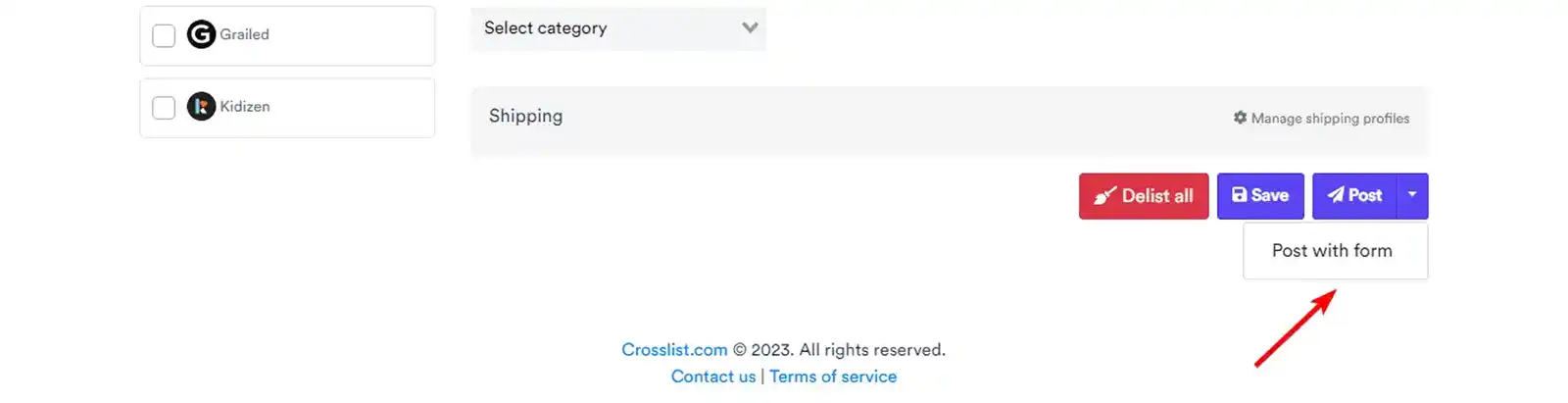
Please be aware that form posting will not allow you to track where your inventory is listed, nor will relist/delist capabilities be available for listings that were posted through form posting.
2) Tracking your inventory will become much easier
The second major change involves inventory management.
Because of the autoposting solution described above, we're now able to expand our inventory management capabilities.
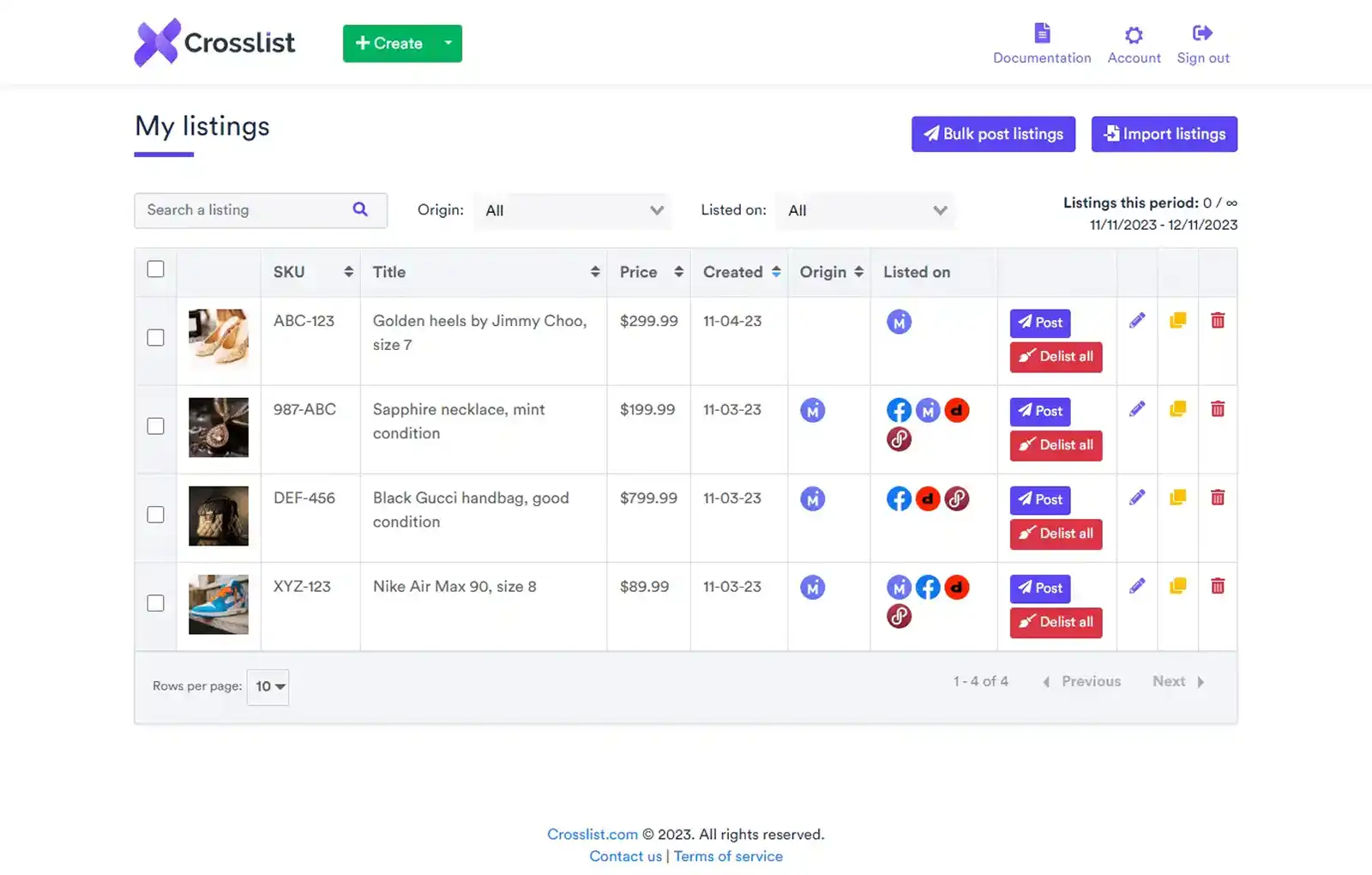
This means that you'll be able to track where your inventory is listed directly from the listing overview.
We will also introduce filters to quickly check which items are currently listed where and where you imported your listings from.
We'll also let you delist centrally from our listing overview through a convenient Delist all button:
3) You'll be able to remove backgrounds from images in bulk
Third, we'll also implement the ability to delete backgrounds from images.
You'll be able to delete the background of each listing separately, or all backgrounds of all images for one particular listing in bulk.
Those are the major changes we're planning to roll out for now.
One question that we expect to get is whether these new features will be available for every plan.
Currently, we plan on implementing it as follows:
Autoposting and relist/delist capabilities will remain available across all plans (just like now).
The remove backgrounds in bulk feature will become available for customers with a Gold plan only. Currently, we foresee no limitations with regard to the number of backgrounds that can be removed per customer, but this may change in the future depending on usage and server load.
That wraps it up for now. I hope that you're as excited about these changes as I am!
If you have any questions, don't hesitate to let me know.
We will keep you posted with regard to the roll-out of these features.
- Gilles from Crosslist
Founder and CEO
Gilles from Crosslist here!
As we approach the threshold of 2024, we're gearing up to launch Crosslist 2.0, a major update that will make listing and managing your inventory on multiple marketplaces even easier! 🔥
In this email, I would like to prepare and inform you - our most valued customers - of the changes you may expect during the coming weeks.
Let's dive into what's coming up:
1) Autoposting will become the default posting action
Autoposting lets you list your listings in the background without needing to manually confirm each listing like with form posting.
Over the past few months, we have gradually rolled out autoposting for all marketplaces except eBay (which be released in the next couple of days as well).
During this period, autoposting has grown to account for nearly 50% of all listings posted daily.
Autoposting comes with several advantages:
Since posting is performed in the background, you won't need to manually confirm each listing like you have to do with form posting. This saves a lot of time on your end.
Autoposting is much more robust: we're proud to state that we currently have a 99% posting success rate across all marketplaces. Next to that, we can also track errors and bugs much more effectively and proactively as opposed to form posting, which allows us to improve our service substantially.
With autoposting, we can expand our inventory management possibilities to include relist/delist capabilities as well as tracking where an item is listed or not. In the future, it will also allow us to introduce autodelist when an item sells.
Autoposting is easier on your computer: unlike with form posting, you won't need to open a new browser tab for each listing and marketplace you're listing on. In addition, we have implemented an automatic queuing system that will allow you to autopost many listings simultaneously without running into rate limits or time-outs. With form posting, this was a lot more difficult, leading to scenarios where images weren't being transferred if e.g. you cross listed 20+ listings in bulk at the same time. With autoposting, this problem does not arise. As a result, we will also make bulk autoposting available from the listing overview as well.
Autoposting allows you to finetune your shipping: as described in this article, with autoposting, you can set up shipping profiles for each marketplace which will determine the shipping settings of each listing. This is currently not possible with form posting, and shipping settings need to be completed manually. Note that setting up shipping profiles for Facebook Marketplace is also underway!
Autoposting is safe and secure: just like with form posting, all listing actions are performed through your computer (via our extension) and never directly through our servers. Therefore, we don't need the credentials of your marketplaces ever (unlike with some mobile cross listing solutions), nor is autoposting a violation of marketplace ToS.
If you want to see autoposting in action, please check out this video where I explain the process in more detail.
Lastly, does this mean that form posting will go away? The answer is no: form posting is here to stay, but more as a backup solution to autoposting.
To accommodate this, we will combine the current Post button into one: if you click on it directly, Crosslist will autopost your listing. To form post, you'll need to click the arrow first, and then click Post with form:
Please be aware that form posting will not allow you to track where your inventory is listed, nor will relist/delist capabilities be available for listings that were posted through form posting.
2) Tracking your inventory will become much easier
The second major change involves inventory management.
Because of the autoposting solution described above, we're now able to expand our inventory management capabilities.
This means that you'll be able to track where your inventory is listed directly from the listing overview.
We will also introduce filters to quickly check which items are currently listed where and where you imported your listings from.
We'll also let you delist centrally from our listing overview through a convenient Delist all button:
3) You'll be able to remove backgrounds from images in bulk
Third, we'll also implement the ability to delete backgrounds from images.
You'll be able to delete the background of each listing separately, or all backgrounds of all images for one particular listing in bulk.
Those are the major changes we're planning to roll out for now.
One question that we expect to get is whether these new features will be available for every plan.
Currently, we plan on implementing it as follows:
Autoposting and relist/delist capabilities will remain available across all plans (just like now).
The remove backgrounds in bulk feature will become available for customers with a Gold plan only. Currently, we foresee no limitations with regard to the number of backgrounds that can be removed per customer, but this may change in the future depending on usage and server load.
That wraps it up for now. I hope that you're as excited about these changes as I am!
If you have any questions, don't hesitate to let me know.
We will keep you posted with regard to the roll-out of these features.
- Gilles from Crosslist
Founder and CEO
Gilles from Crosslist here!
As we approach the threshold of 2024, we're gearing up to launch Crosslist 2.0, a major update that will make listing and managing your inventory on multiple marketplaces even easier! 🔥
In this email, I would like to prepare and inform you - our most valued customers - of the changes you may expect during the coming weeks.
Let's dive into what's coming up:
1) Autoposting will become the default posting action
Autoposting lets you list your listings in the background without needing to manually confirm each listing like with form posting.
Over the past few months, we have gradually rolled out autoposting for all marketplaces except eBay (which be released in the next couple of days as well).
During this period, autoposting has grown to account for nearly 50% of all listings posted daily.
Autoposting comes with several advantages:
Since posting is performed in the background, you won't need to manually confirm each listing like you have to do with form posting. This saves a lot of time on your end.
Autoposting is much more robust: we're proud to state that we currently have a 99% posting success rate across all marketplaces. Next to that, we can also track errors and bugs much more effectively and proactively as opposed to form posting, which allows us to improve our service substantially.
With autoposting, we can expand our inventory management possibilities to include relist/delist capabilities as well as tracking where an item is listed or not. In the future, it will also allow us to introduce autodelist when an item sells.
Autoposting is easier on your computer: unlike with form posting, you won't need to open a new browser tab for each listing and marketplace you're listing on. In addition, we have implemented an automatic queuing system that will allow you to autopost many listings simultaneously without running into rate limits or time-outs. With form posting, this was a lot more difficult, leading to scenarios where images weren't being transferred if e.g. you cross listed 20+ listings in bulk at the same time. With autoposting, this problem does not arise. As a result, we will also make bulk autoposting available from the listing overview as well.
Autoposting allows you to finetune your shipping: as described in this article, with autoposting, you can set up shipping profiles for each marketplace which will determine the shipping settings of each listing. This is currently not possible with form posting, and shipping settings need to be completed manually. Note that setting up shipping profiles for Facebook Marketplace is also underway!
Autoposting is safe and secure: just like with form posting, all listing actions are performed through your computer (via our extension) and never directly through our servers. Therefore, we don't need the credentials of your marketplaces ever (unlike with some mobile cross listing solutions), nor is autoposting a violation of marketplace ToS.
If you want to see autoposting in action, please check out this video where I explain the process in more detail.
Lastly, does this mean that form posting will go away? The answer is no: form posting is here to stay, but more as a backup solution to autoposting.
To accommodate this, we will combine the current Post button into one: if you click on it directly, Crosslist will autopost your listing. To form post, you'll need to click the arrow first, and then click Post with form:
Please be aware that form posting will not allow you to track where your inventory is listed, nor will relist/delist capabilities be available for listings that were posted through form posting.
2) Tracking your inventory will become much easier
The second major change involves inventory management.
Because of the autoposting solution described above, we're now able to expand our inventory management capabilities.
This means that you'll be able to track where your inventory is listed directly from the listing overview.
We will also introduce filters to quickly check which items are currently listed where and where you imported your listings from.
We'll also let you delist centrally from our listing overview through a convenient Delist all button:
3) You'll be able to remove backgrounds from images in bulk
Third, we'll also implement the ability to delete backgrounds from images.
You'll be able to delete the background of each listing separately, or all backgrounds of all images for one particular listing in bulk.
Those are the major changes we're planning to roll out for now.
One question that we expect to get is whether these new features will be available for every plan.
Currently, we plan on implementing it as follows:
Autoposting and relist/delist capabilities will remain available across all plans (just like now).
The remove backgrounds in bulk feature will become available for customers with a Gold plan only. Currently, we foresee no limitations with regard to the number of backgrounds that can be removed per customer, but this may change in the future depending on usage and server load.
That wraps it up for now. I hope that you're as excited about these changes as I am!
If you have any questions, don't hesitate to let me know.
We will keep you posted with regard to the roll-out of these features.
- Gilles from Crosslist
Founder and CEO
Gilles from Crosslist here!
As we approach the threshold of 2024, we're gearing up to launch Crosslist 2.0, a major update that will make listing and managing your inventory on multiple marketplaces even easier! 🔥
In this email, I would like to prepare and inform you - our most valued customers - of the changes you may expect during the coming weeks.
Let's dive into what's coming up:
1) Autoposting will become the default posting action
Autoposting lets you list your listings in the background without needing to manually confirm each listing like with form posting.
Over the past few months, we have gradually rolled out autoposting for all marketplaces except eBay (which be released in the next couple of days as well).
During this period, autoposting has grown to account for nearly 50% of all listings posted daily.
Autoposting comes with several advantages:
Since posting is performed in the background, you won't need to manually confirm each listing like you have to do with form posting. This saves a lot of time on your end.
Autoposting is much more robust: we're proud to state that we currently have a 99% posting success rate across all marketplaces. Next to that, we can also track errors and bugs much more effectively and proactively as opposed to form posting, which allows us to improve our service substantially.
With autoposting, we can expand our inventory management possibilities to include relist/delist capabilities as well as tracking where an item is listed or not. In the future, it will also allow us to introduce autodelist when an item sells.
Autoposting is easier on your computer: unlike with form posting, you won't need to open a new browser tab for each listing and marketplace you're listing on. In addition, we have implemented an automatic queuing system that will allow you to autopost many listings simultaneously without running into rate limits or time-outs. With form posting, this was a lot more difficult, leading to scenarios where images weren't being transferred if e.g. you cross listed 20+ listings in bulk at the same time. With autoposting, this problem does not arise. As a result, we will also make bulk autoposting available from the listing overview as well.
Autoposting allows you to finetune your shipping: as described in this article, with autoposting, you can set up shipping profiles for each marketplace which will determine the shipping settings of each listing. This is currently not possible with form posting, and shipping settings need to be completed manually. Note that setting up shipping profiles for Facebook Marketplace is also underway!
Autoposting is safe and secure: just like with form posting, all listing actions are performed through your computer (via our extension) and never directly through our servers. Therefore, we don't need the credentials of your marketplaces ever (unlike with some mobile cross listing solutions), nor is autoposting a violation of marketplace ToS.
If you want to see autoposting in action, please check out this video where I explain the process in more detail.
Lastly, does this mean that form posting will go away? The answer is no: form posting is here to stay, but more as a backup solution to autoposting.
To accommodate this, we will combine the current Post button into one: if you click on it directly, Crosslist will autopost your listing. To form post, you'll need to click the arrow first, and then click Post with form:
Please be aware that form posting will not allow you to track where your inventory is listed, nor will relist/delist capabilities be available for listings that were posted through form posting.
2) Tracking your inventory will become much easier
The second major change involves inventory management.
Because of the autoposting solution described above, we're now able to expand our inventory management capabilities.
This means that you'll be able to track where your inventory is listed directly from the listing overview.
We will also introduce filters to quickly check which items are currently listed where and where you imported your listings from.
We'll also let you delist centrally from our listing overview through a convenient Delist all button:
3) You'll be able to remove backgrounds from images in bulk
Third, we'll also implement the ability to delete backgrounds from images.
You'll be able to delete the background of each listing separately, or all backgrounds of all images for one particular listing in bulk.
Those are the major changes we're planning to roll out for now.
One question that we expect to get is whether these new features will be available for every plan.
Currently, we plan on implementing it as follows:
Autoposting and relist/delist capabilities will remain available across all plans (just like now).
The remove backgrounds in bulk feature will become available for customers with a Gold plan only. Currently, we foresee no limitations with regard to the number of backgrounds that can be removed per customer, but this may change in the future depending on usage and server load.
That wraps it up for now. I hope that you're as excited about these changes as I am!
If you have any questions, don't hesitate to let me know.
We will keep you posted with regard to the roll-out of these features.
- Gilles from Crosslist
Founder and CEO